


Drawtify Review: Graphic design is a must-have skill for nearly anyone in business, from small businesses creating a new logo to marketers working on the next big ad campaign. However, not everyone has the time (or the budget) to learn how to use complex software like Photoshop or Illustrator. This is where we can utilize Drawtify—an affordable, easy-to-use graphic design software that you can rely on, available in 2025.
Whether you’re an experienced graphic designer who needs something fast or a small business owner who’s taking design into your own hands, we’ll provide you with an in-depth look at Drawtify, including its features, pricing, and exclusive deals. Continue reading to determine if it’s a good fit for you and your creative ideas.
Drawtify is an online illustrator and vector graphics editor designed for both beginners and professionals. Drawtify differs from other tool providers as it’s a user-friendly and powerful online tool that caters to designers, content creators, and businesses to create attractive and visually engaging content without prior design knowledge. This new step-by-step software lets anyone create Beautiful Vector Designs, illustrations, and graphics using a simple point-and-click interface with push-button Simplicity!
What is Drawtify?
Drawtify is a comprehensive online vector graphic design solution that enables creators to work efficiently and easily to create high-quality design graphics. As Drawtify is a direct online application, it’s easy to use for both beginners and professionals. It is easy to use yet versatile enough for:
- Graphic Designers who want an easier way to do what industry giants do.
- Marketers looking to design glossy infographics, ads, or social media posts.
- LOGO design, brochure design, and presentation design for Small Business Owners too busy to design!
In stark contrast to bulky desktop software, Drawtify is lightweight and easy to use, offering all the features that both casual users and professionals need.
Key Features of Drawtify in 2025
Drawtify packs a surprising punch when it comes to features, especially for its affordable price point. Here’s what sets it apart:
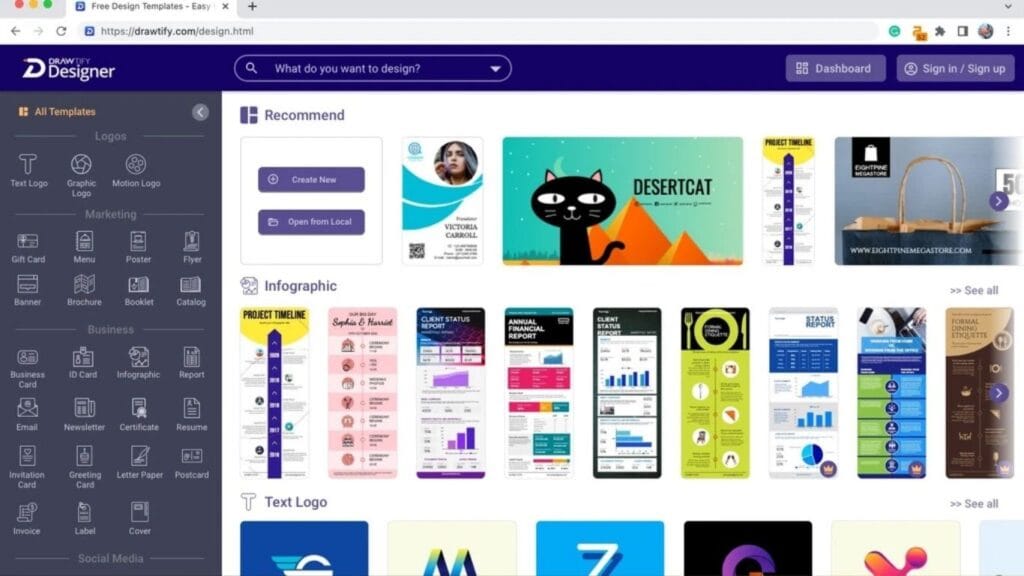
1. Templates Galore for Quick Design Work
Drawtify offers an extensive library of pre-designed templates, catering to a variety of needs, including:
- Logos: Build a professional brand identity quickly.
- Infographics: Perfect for marketers and businesses looking to visualize data.
- Flyers & Posters: Great for advertising events, products, or campaigns.
- Social Media Content: Eye-catching designs optimized for platforms like Instagram, Facebook, and LinkedIn.
Even for individuals without design experience, these templates serve as a solid starting point, requiring minimal customization to make them uniquely yours.
2. Cloud-Based Convenience
No downloads, no installations—Drawtify is entirely cloud-based. All you need is an internet connection, and you can design on any device, from desktop to tablet. This makes it a game-changer for remote teams or anyone juggling work on multiple devices.
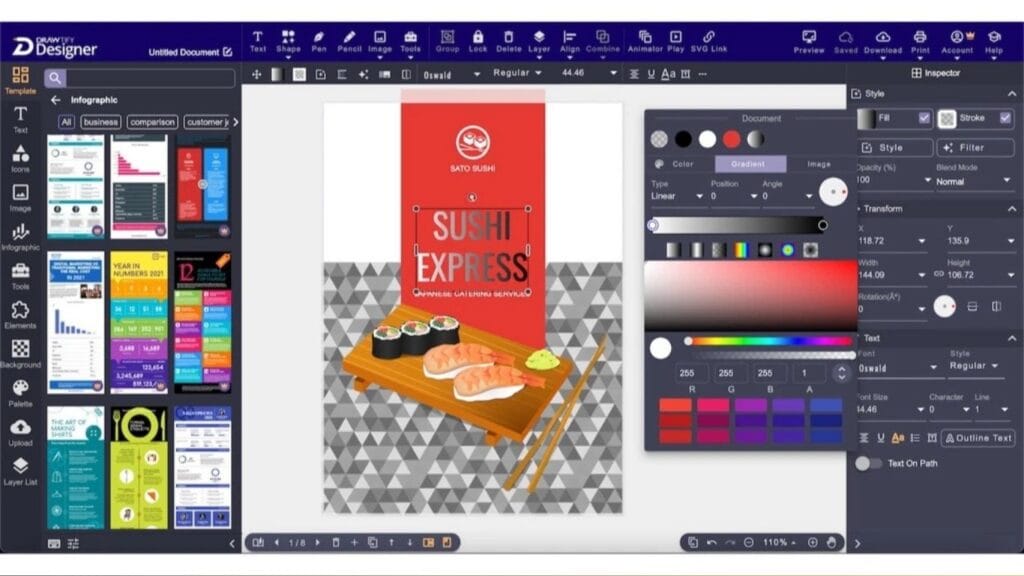
3. Advanced Vector Editing Tools
Despite its approachable interface, Drawtify includes advanced vector editing capabilities for experienced designers. You can:
- Resize vectors without quality loss.
- Edit paths and shapes with precision.
- Incorporate advanced effects like gradients and shadows.
This functionality positions Drawtify as a serious contender for designers who need a versatile tool without the clutter or complexity.
4. Animation Features
New in 2025, Drawtify has expanded its capabilities to include basic animation tools. Users can now create animated graphics ideal for:
- Video marketing.
- Website banners.
- Social media GIFs.
This feature is particularly appealing for marketers aiming to keep their visuals dynamic and engaging.
5. Collaboration Made Easy
Working with a team? Drawtify makes online collaboration hassle-free. Share designs, get feedback, and make edits—all in real time. It’s perfect for marketing agencies and businesses that thrive on teamwork.
6. Custom Fonts & Icons Library
Drawtify comes equipped with an expansive library of fonts and icons. Whether you’re branding a business or creating unique social media posts, you’re sure to find the perfect elements to enhance your designs.
7. Export Options for Every Need
Once your design is complete, exporting is quick and straightforward. Export formats include:
- High-resolution PNG, JPEG, and SVG files.
- Print-ready PDFs.
- Animated GIFs or video files (for designs with animations).
This flexibility ensures you can use your designs across both print and digital platforms.
Get.. Drawtify Review & Lifetime deal
Online graphic design software Drawtify features
Drawtify’s user interface is simple, straightforward, and packed with all the necessary tools for graphic design. Here are some of the standout features that set it apart from other online design platforms:
1. Pre-designed Templates
Drawtify has you covered wherever you’re coming from, with more than 10,000 pre-made templates in various categories (logos, business cards, social media posts, etc.), providing a platform to elevate your visuals to the next level, regardless of your specific design needs. These mockup templates are customizable and offer a great reference for your designs.
2. Extensive Design Tools
Drawtify is a full-featured graphic design software that combines vector editing tools, design, and layout in one, making it easy to create professional graphics. It is simple to use and allows you to design professional-looking designs in no time.
3. Stock Library
Drawtify also comes with a vast library of free stock photos, icons, illustrations, and shapes that you can use in your designs. This saves you from having to subscribe or purchase elsewhere on another stock photo site.
4. Collaborative Features
Drawtify is also equipped with collaborative design team capabilities, allowing teams to work on design tasks simultaneously. This is also ideal for businesses with distributed teams or clients who want to be involved in the design process.
Why Choose Drawtify?
Drawtify offers a perfect combination of cost, options, and ease of use for many designers. Here’s the reason it might be worth thinking about:
- Affordable Pricing: Memberships are a fraction of the cost of other similar services.
- Ease of Use: Intuitive interface lowers the learning curve significantly.
- Regular Updates: The developers consistently roll out new features and templates.
- Cross-Platform Accessibility: No need to commit to specific systems—Drawtify works seamlessly in any browser.
Drawtify Pros & Cons in 2025
As with any software, Drawtify has its strengths and areas for improvement. Here’s what we loved, and a few things to keep in mind:
Pros:
- Easy to use for beginners.
- Affordable pricing plans for individuals or teams.
- Extensive library of templates, fonts, and icons.
- Cloud-based convenience allows access from anywhere.
- Advanced vector editing tools for experienced designers.
Cons:
- Limited animation capabilities compared to specialized animation software.
- Some advanced features may be limiting for professional designers used to more complex software like Adobe Illustrator.
Who is Drawtify Best Suited For?
While Drawtify caters to a diverse audience, here are the groups that will benefit most from this tool:
- Graphic Designers: A lightweight alternative for faster, simpler design tasks.
- Marketers: Ideal for creating professional ads, presentations, and social media visuals.
- Small Business Owners: Empowering entrepreneurs to craft branding materials without hiring expensive designers.
Alternatives to Drawtify
While Drawtify is an excellent tool, it’s always a good idea to compare alternatives based on your unique needs. Other popular design tools include:
- Canva: Perfect for social media templates but offers less advanced vector editing.
- Adobe Spark: Great for quick graphics but limited in customization compared to Drawtify.
- Vectr: A free tool that’s simpler but lacks some of Drawtify’s premium offerings.
Choose Drawtify if you’re looking for the sweet spot between ease, functionality, and cost.
Drawtify Verified Ratings in 2025
Here’s what users are saying about Drawtify on verified review platforms:
- G2 Crowd: Rated 4.5/5 stars based on over 100 reviews.
- Trustpilot: Rated 4.7/5 stars based on over 500 reviews.
Users rave about the program’s intuitive interface, extensive template library, and value for money.
Customer Reviews & Feedback
The ease of use and rich functions have won praise from users for Drawtify. Freelancers and small business entities, in particular, appreciate the simple-to-use interface and reasonable price point. Several of us have mentioned that Drawtify is now an indispensable tool in our design routine, enabling us to create commercial-level visuals that work for us and enhance our brand’s visibility.
Pricing & Subscription Plans
Drawtify has developed cost-effective pricing suitable for you or your team:
- Free Plan: Basic tools, a free template library , and suitable for occasional users.
- Pro Plan ($14.99/month or $109/year): Includes full access to premium templates, advanced editing tools, and animation features.
- Team Plan ($34.99/month): Best for businesses, offering multi-user accounts and enhanced collaboration tools.
Looking for more savings? See Drawtify’s Current Seasonal Markdowns. Save 30% on the exclusive 2025 discount: Pre-Order Next Year Today. Save 30% on a Drawtify Annual Subscription for a limited time.
Get.. Drawtify Review & Lifetime deal
Special Offers & Deals You Can’t Miss in 2025
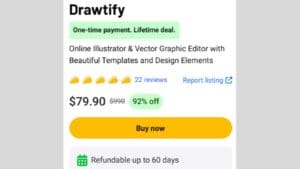
Drawtify offers several pricing plans to suit various needs, from individuals to businesses and teams. But as a reader of this blog, you can enjoy an exclusive deal:
Conclusion
As we conclude this Drawtify review in 2025, it is evident that the software has established itself as one of the best graphic design platforms. Offering a reasonable price, intuitive usage, and packed with powerful features, it’s surely a must-try for those who want to enhance their designs in 2025! And, of course, be sure to use our special promo code to start designing beautiful graphics with Drawtify now!
Get.. Drawtify Review Lifetime deal
Drawtify FAQ
How Does Drawtify Compare to Other Graphic Design Tools?
As mentioned, Drawtify stands out for its user-friendly interface and affordable pricing. It also offers a unique feature called Magic Layout, which automatically designs your layout based on the content you input. This streamlines the design process, particularly for beginners who may struggle with layout and composition.
Other notable features include:
- A vast library of templates, fonts, shapes, and illustrations (over 1 million assets!)
- An intuitive text editor with advanced typography options.
- The ability to import custom fonts and images.
- Vector drawing tools for creating original graphics.
- Export options in various formats including PNG, SVG, PDF, and more.
How Much Does Drawtify Cost?
Drawtify offers a variety of subscription plans to fit different budget and usage needs. The most affordable option is the Basic plan at $5/month, which includes access to all features but limits you to 50 designs per month. For unlimited designs, you can upgrade to the Pro plan at $10/month or opt for the annual subscription at discounted rates.
Are There any Special Deals or Offers Available?
Yes! As part of their ongoing promotions in 2025, Drawtify is offering exclusive discounts on their annual subscriptions, with savings up to 40%. Additionally, they also provide a free trial period for new users to test out the features before committing to a subscription.


 US Dollor
 Bangladeshi Tk
Gave 177slotgame a shot. I was pleasantly surprised! They have a solid selection of games, and the site runs smoothly on my phone. I’d recommend giving this one a go with this link 177slotgame.
phtaya10 https://www.phtaya10y.com
slotphlogin https://www.exslotphlogin.net
tg77com https://www.tg77com.org
bet777app https://www.bet777appv.org
playpal77 https://www.playpal77sy.org
phtaya06 https://www.phtaya06y.com